Most “getting started” tutorials show you how to build an agent. This one shows you how to build an agent that works reliably. The difference is the harness: the verification, cost controls, and error handling that separate a demo from a production system.
By the end of this tutorial, you will have a working agent with tool integration, verification loops after every tool call, basic cost controls, and structured error handling. Not a demo. A foundation you can extend into a production system.
Interactive Concept Map
Click any node to expand or collapse. Use the controls to zoom, fit to view, or go fullscreen.
What You Need Before Starting
Prerequisites:
– Python 3.10 or higher
– An API key from Anthropic, OpenAI, or another LLM provider
– Basic Python experience (functions, classes, dictionaries)
– A terminal
What you will build: A research agent that takes a topic, searches for information using web tools, synthesizes findings, and produces a structured summary. The agent includes harness infrastructure from the start.
Step 1: Set Up the Project Structure
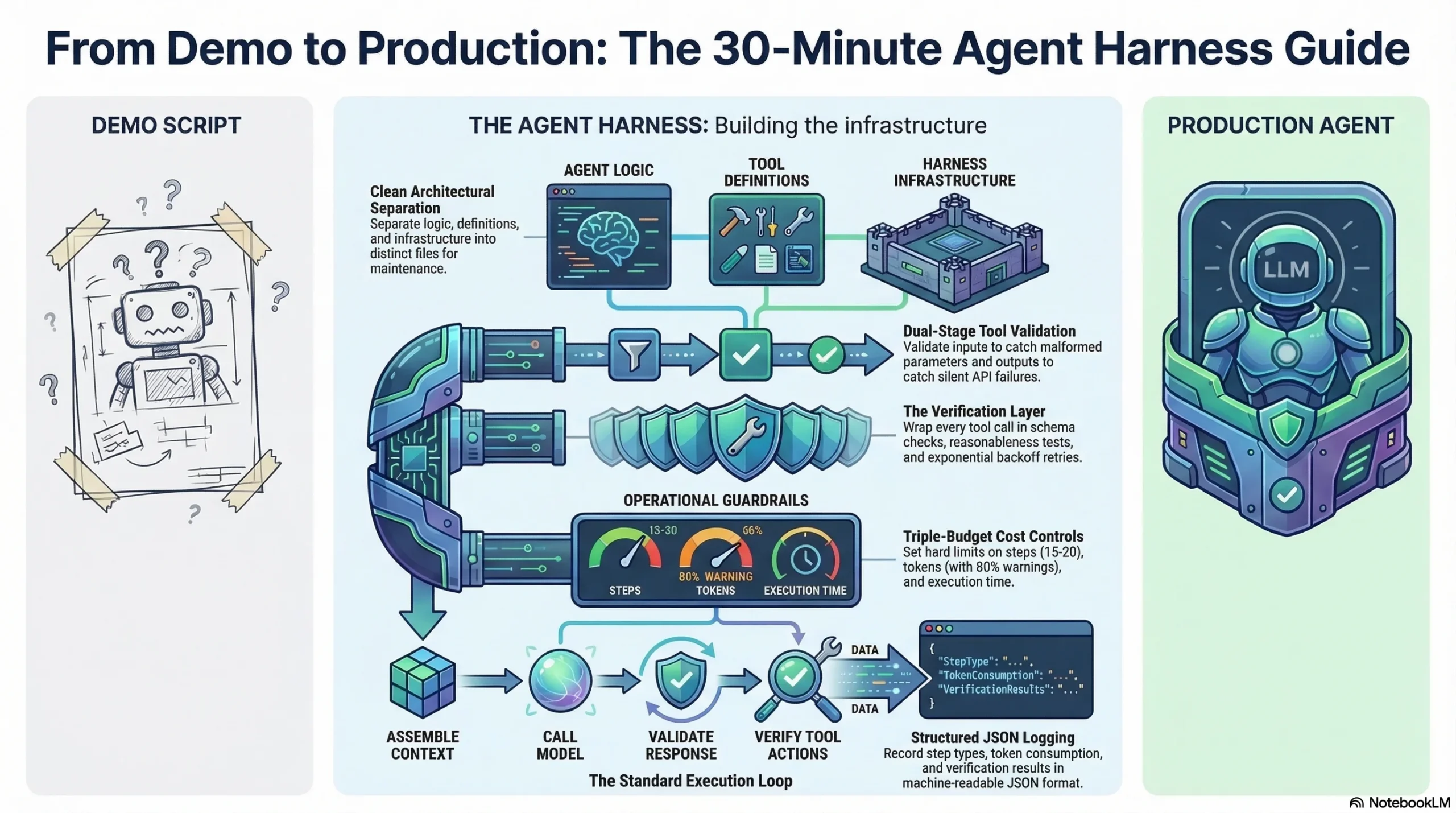
Create the project with a structure that separates agent logic from harness infrastructure.
my-agent/
  agent.py          # Agent logic
  harness.py        # Harness infrastructure
  tools.py          # Tool definitions and integration
  config.py         # Configuration and cost limits
  run.py            # Entry point
This separation matters. When you need to add verification logic or cost controls later, you modify harness.py without touching the agent logic. When you need to add new tools, you modify tools.py. Clean separation prevents the tangle that makes production agents hard to maintain.
Step 2: Define Your Tools with Validation
Tools are how agents interact with the world. Every tool definition needs three things: a clear description for the model, input validation, and output validation.
The tool description is the model’s only interface to your tool. If it is ambiguous, the model will call the tool incorrectly. Write descriptions as if explaining the tool to a new team member who needs to use it correctly on the first try.
Input validation catches malformed parameters before they hit external APIs. Check types, required fields, and reasonable value ranges. A tool call with missing parameters should fail fast with a clear error, not silently produce garbage.
Output validation catches failures that the external API does not report. A 200 response with an empty body, a valid JSON response with missing fields, or a response with values outside expected ranges are all failures that input validation cannot catch.
Step 3: Build the Verification Layer
This is the step most tutorials skip. It is also the step that determines whether your agent works once or works consistently.
The verification layer wraps around every tool call with three checks:
Schema validation. Does the response match the expected structure? Are required fields present? Are data types correct?
Reasonableness checks. Are values within expected ranges? Is the response size reasonable? Does the timestamp make sense?
Retry logic. When verification fails, retry with exponential backoff. Start with a 1-second delay, double on each retry, cap at 3 attempts. If all retries fail, return a structured error that the agent can reason about.
The key insight: do not let the agent process unverified tool responses. A single corrupt data point in step 3 of a 20-step task corrupts every subsequent step.
Step 4: Add Cost Controls
Without cost controls, a single stuck agent loop can consume hundreds of dollars in API calls overnight. Add three controls from the start.
Step budget. Limit the maximum number of steps per task. For a research agent, 15-20 steps is reasonable. If the agent has not completed the task in 20 steps, it is probably stuck in a loop.
Token budget. Track token consumption per request. Set a maximum (for example, 100,000 tokens per task). When consumption hits 80% of the budget, log a warning. At 100%, halt gracefully and return whatever partial results are available.
Time budget. Set a maximum execution time. A research task that takes more than 5 minutes is likely encountering issues. Time limits prevent silent hangs.
These controls are not restrictions on agent capability. They are guardrails that catch failures. A well-functioning agent completes research tasks in 5-10 steps. Hitting the step budget means something went wrong.
Step 5: Implement the Agent Loop
The agent loop is the core execution cycle: present context to the model, receive a response, determine the action, execute it, and loop.
The execution flow:
- Assemble the context: system prompt, conversation history, available tools
- Call the model with the assembled context
- Parse the response: is it a final answer or a tool call?
- If tool call: validate parameters, execute through the harness, verify the response
- If final answer: validate quality, deliver to user
- Loop until completion, step budget, or token budget
Termination conditions matter. Define explicit conditions for when the agent should stop: task completed, step budget reached, token budget reached, or unrecoverable error encountered. Without explicit termination, agents can loop indefinitely.
Step 6: Add Structured Logging
You cannot debug what you cannot see. Add structured logging from the start, not as an afterthought.
Log every agent step with:
- Step number and type (tool call, reasoning, final answer)
- Token consumption for the step and cumulative total
- Tool call details (which tool, what parameters, what response)
- Verification results (pass, fail, retry count)
- Elapsed time per step and total
Structure your logs as JSON so they can be parsed programmatically. When your agent fails in production (and it will), these logs are how you reconstruct what happened.
Step 7: Run and Test
Run your agent with a simple task first. “Research the current state of AI agent frameworks” is a good starting point: it requires tool use, synthesis, and structured output.
What to check on the first run:
- Does the agent call tools appropriately?
- Do verification checks pass or fail? (Some failures are expected and healthy)
- Does the step count stay within budget?
- Are logs capturing every step?
- Does the final output address the research question?
Common first-run issues:
- Agent does not call any tools. The tool descriptions are unclear or the system prompt does not instruct the agent to use tools.
- Agent loops without progress. Missing or unclear termination conditions. Add explicit completion criteria.
- Verification fails on every tool call. Schema validation is too strict. Relax the validation to match actual API responses.
- Agent runs out of step budget. The task is too complex for the step limit, or the agent is making unnecessary tool calls. Increase the budget or improve the system prompt.
What You Have Now
After completing these steps, you have an agent with:
| Component | What It Does |
|---|---|
| Tool integration | Validated inputs and outputs for every external call |
| Verification loops | Schema validation, reasonableness checks, retry logic |
| Cost controls | Step budget, token budget, time budget |
| Structured logging | JSON logs capturing every decision and action |
| Clean architecture | Separated agent logic, harness infrastructure, and tools |
This is not a demo. It is a foundation with the same architectural patterns used by production agent systems. Every component you add from here, whether it is RAG retrieval, multi-agent orchestration, or human-in-the-loop workflows, builds on this harness infrastructure.
Next Steps
Extend the verification layer. Add model-based graders that evaluate output quality before delivery. Implement trajectory evaluation that checks the full sequence of agent actions.
Add persistence. Implement checkpoint-resume so the agent can recover from interruptions. Save progress to a file after each step. Load progress when restarting.
Connect to production tools. Replace mock tools with real API integrations. Each new tool needs the same validation wrapper: input validation, output schema checks, and retry logic.
Study the architecture. Read the complete guide to agent harness to understand how your starter harness fits into the full five-layer architecture. Review the LangChain comparison to understand how frameworks and harnesses work together.
Subscribe to the newsletter for weekly tutorials, tool evaluations, and production patterns that build on this foundation.
Frequently Asked Questions
Do I need a framework like LangChain to get started?
No. You can build a harness directly on the model provider’s API. Frameworks add convenience and abstractions, but the harness patterns (verification, cost controls, structured logging) are independent of any framework. Start simple and add a framework when you need its specific abstractions.
How long does it take to go from this tutorial to production?
This tutorial gives you the foundation. Going to production requires additional work: comprehensive evaluation suites, production monitoring and alerting, security hardening, and load testing. Plan for 4-8 weeks of additional work for a focused production deployment.
Should I build my harness or use an existing one?
For learning, build it yourself. Understanding why each component exists is essential for debugging production issues. For production, evaluate existing harness frameworks (DeepAgents, Claude Agent SDK) and decide whether their opinionated defaults fit your use case.
What is the most important thing to get right first?
Verification. An agent without verification will produce wrong results silently. An agent with verification catches errors, retries, and escalates. Start with tool call verification and expand from there.
1 thought on “Getting Started with Agent Harness: Your First Agent in 30 Minutes”